
It happened again. With the best intentions in the world I was going to make a simple game. Alas my large graveyard of games should have been all the warning I needed, but scope creep, grandiose ideas and worldbuilding found their way back in. Still, surely there was something to learn here!?
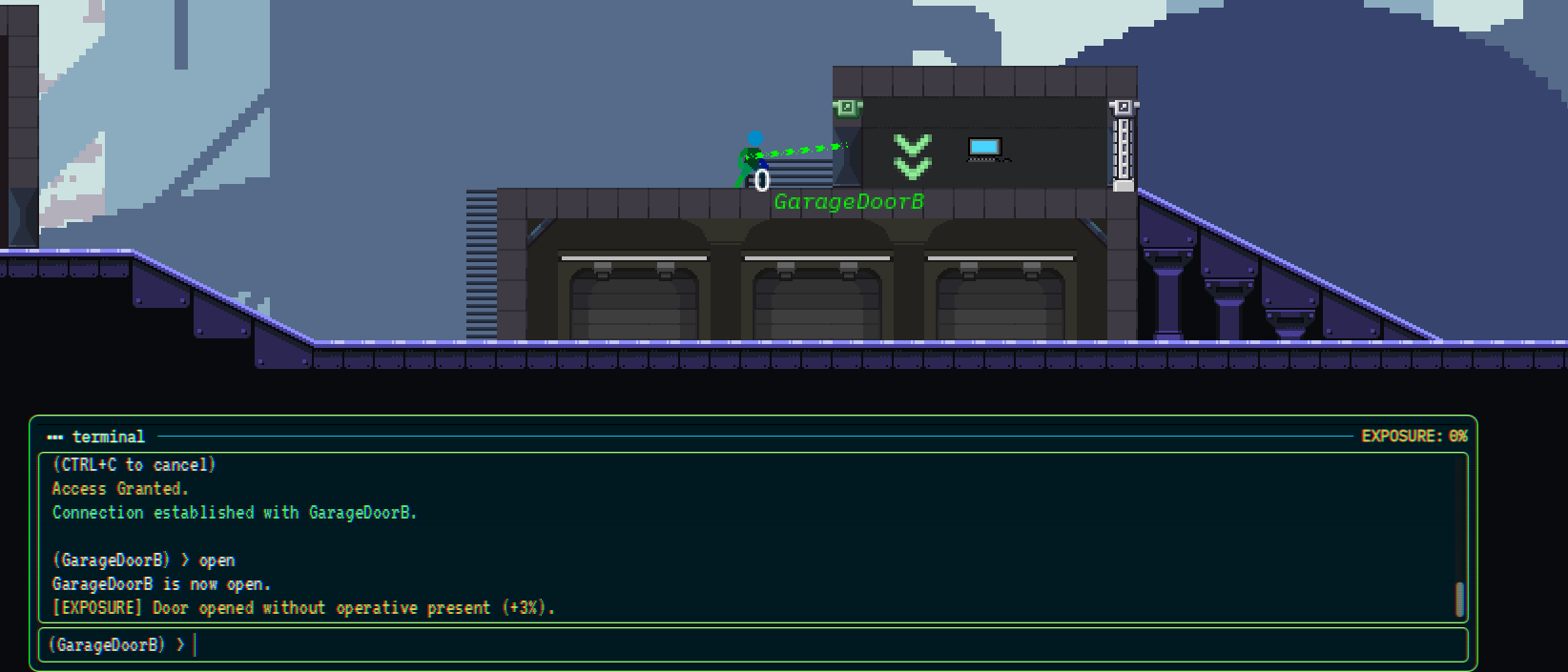
The game, and where it got out of hand
A 2D puzzle platformer where you use your trusty terminal to enter commands to hack devices on a network and break into physical locations, avoiding guards and defence systems. Inspired by the fantastic Mr. Robot series and the Watch Dogs games.
This started with a small idea; giving the player access to the terminal commands you find in lots of games. I remember spending hours in The Elder Scrolls: Oblivion running commands to build the ultimate character and thought it would be an interesting hook, to give a player access to this kind of developer tooling to solve puzzles.
The scope creep was almost immediate:
- I built a story around the concept.
- I had to build a world for the story, complete with anti-consumerism messaging, factions and a government to overthrow.
- I wrote characters and dialogue to help and hinder your journey through the game.
Rather than getting a playable prototype together, I couldn’t bring myself to show anyone until it ‘made sense’ as a game. That’s clear evidence I hadn’t found the core game loop that’s immediately fun, so I kept adding visuals, mechanics, and at one point, dialogue.
Takeaway 1: FIND THE FUN
Systems thinking
At the heart of the game is a system, consisting of a set of small, composable pieces. A level has a Network. A network contains Devices (doors, lifts, laser emitters, speakers, workstations). Each device is then built from child nodes that answer one question each:
- Can I find it? A
TriangulationStrategy - Can I connect to it? A
ConnectionStrategy - What stops me getting in? A
SecurityDispatcherwith one or moreSecurityProtocols - What can I do once I’m in? One or more
Commands
For example, here’s what a door looks like in a level once it’s assembled. There’s no door-specific code for any of this (finally an example of an easy ‘Door Problem’). It’s all nodes dropped onto the door in the editor:
Network
└── Door                          (device_name = "EntryDoor", exposure_value = 3)
    ├── DistanceLocateDeviceStrategy   max_distance = 500
    ├── DistanceConnectionStrategy     max_distance = 100
    ├── SecurityDispatcher
    │   └── PasswordSecurityProtocol   password = "..."
    ├── DeviceCommand  "open"  -> open_door
    └── DeviceCommand  "close" -> close_door
The base Device just looks at its children when it starts and wires up whatever it finds:
class_name Device
extends Node2D

signal increase_exposure(exposure_value: int)

@export var device_name: String = "Generic Device"

var commands: Array[Command] = []
var locate_strategy: TriangulationStrategy = null
var connection_strategy: ConnectionStrategy = null


func _ready() -> void:
	for child in get_children():
		if child is Command:
			commands.append(child)

		if child is DeviceCommand:
			child.device_command_execute.connect(_on_device_command_execute)

		if child is ConnectionStrategy:
			connection_strategy = child

		if child is TriangulationStrategy:
			locate_strategy = child
	# ...


func is_connectable(character: Character) -> bool:
	if connection_strategy:
		return connection_strategy.is_connectable(character)
	return true
That means a new device type is just a scene plus a script with its behaviour. All the networking, scanning, connecting and security can be added as strategies to any device.
The systems also fed into each other. Every network keeps an exposure value. Noisy hacking (opening a door with nobody there, failing a password, skimming funds) raises it, and it slowly decays over time:
class_name Network
extends Node

@export var exposure: int = 0
@export var exposure_decay_amount: int = 5
@export var exposure_decay_rate: float = 30.0

@onready var devices: Array[Node] = find_children("*", "Device", false)


func _ready() -> void:
	for device: Device in devices:
		device.increase_exposure.connect(_on_device_increase_exposure)
	# ... start a repeating timer that calls _on_exposure_decay_timeout


func _on_device_increase_exposure(exposure_value: int) -> void:
	exposure += exposure_value


func _on_exposure_decay_timeout() -> void:
	exposure = max(0, exposure - exposure_decay_amount)
Each SecurityProtocol has a threshold. When you try to connect, the device’s dispatcher picks the strongest protocol your current exposure has unlocked:
func get_maximum_security_protocol(exposure: int) -> SecurityProtocol:
	var max_protocol: SecurityProtocol = null
	var max_threshold: int = -1
	for protocol in protocols:
		if protocol.threshold <= exposure and protocol.threshold > max_threshold:
			max_protocol = protocol
			max_threshold = protocol.threshold
	return max_protocol
So a door might let you straight in while you’re quiet, but once you’ve been sloppy it starts asking for an admin password.
Once these pieces existed, when building a level I could take my programmer hat off, and put my level designer hat on. Pick some devices, give them strategies and security, and you have a puzzle. Rinse and repeat until you have a game!
This is where I could move fastest and if I had stopped with these systems and built as many puzzles as I could in say, a week, then showed it to as many people as possible, I probably would have had a better idea if it was fun or not.
Takeaway 2: Build the system, then use it to churn out levels fast and get feedback before adding anything else.
Callable functions: the terminal runs real game code
Terminal commands were written to execute the functions of a device directly, much like you would expose the properties and methods of your game objects in a developer tool.
A DeviceCommand maps what the player types onto a method name on its parent device:
class_name DeviceCommand
extends Command

signal device_command_execute(command_identifier: String, terminal: Terminal, params: Array)

@export var target_function: String = ""


func execute(terminal: Terminal, _network, params: Array) -> void:
	var function_name = target_function if target_function != "" else command_identifier
	device_command_execute.emit(function_name, terminal, params)
And the device dispatches it dynamically. If the method exists, call it:
func _on_device_command_execute(command_name: String, terminal: Terminal, params: Array) -> void:
	if has_method(command_name):
		call(command_name, terminal, params)
	else:
		terminal._write_error("Error '" + command_name + "' not found")
So on the door scene, the command open points at open_door, and the door script just has to implement it:
func open_door(terminal: Terminal, _params) -> void:
	if is_open:
		terminal._type_text(device_name + " is already open.\n")
		return

	is_open = true
	animation_player.play("open")
	terminal._type_text(device_name + " is now open.\n")

	if exposure_value > 0:
		terminal._type_text("[EXPOSURE] opened without operative present", "exposure")
		increase_exposure.emit(exposure_value)
The same pattern gives you goto [floor] and lsfloors on a lift, off / cycle [rate] on the laser emitters, and play_sound / loop on speaker panels, which emit a noise that guards can react to. Each one is a few lines on the device and a node in the editor.
When you connect, the terminal swaps its command list to that device’s commands plus anything flagged globally_scoped, so the prompt changes to (EntryDoor) > and help only shows what the scoped device can actually do.
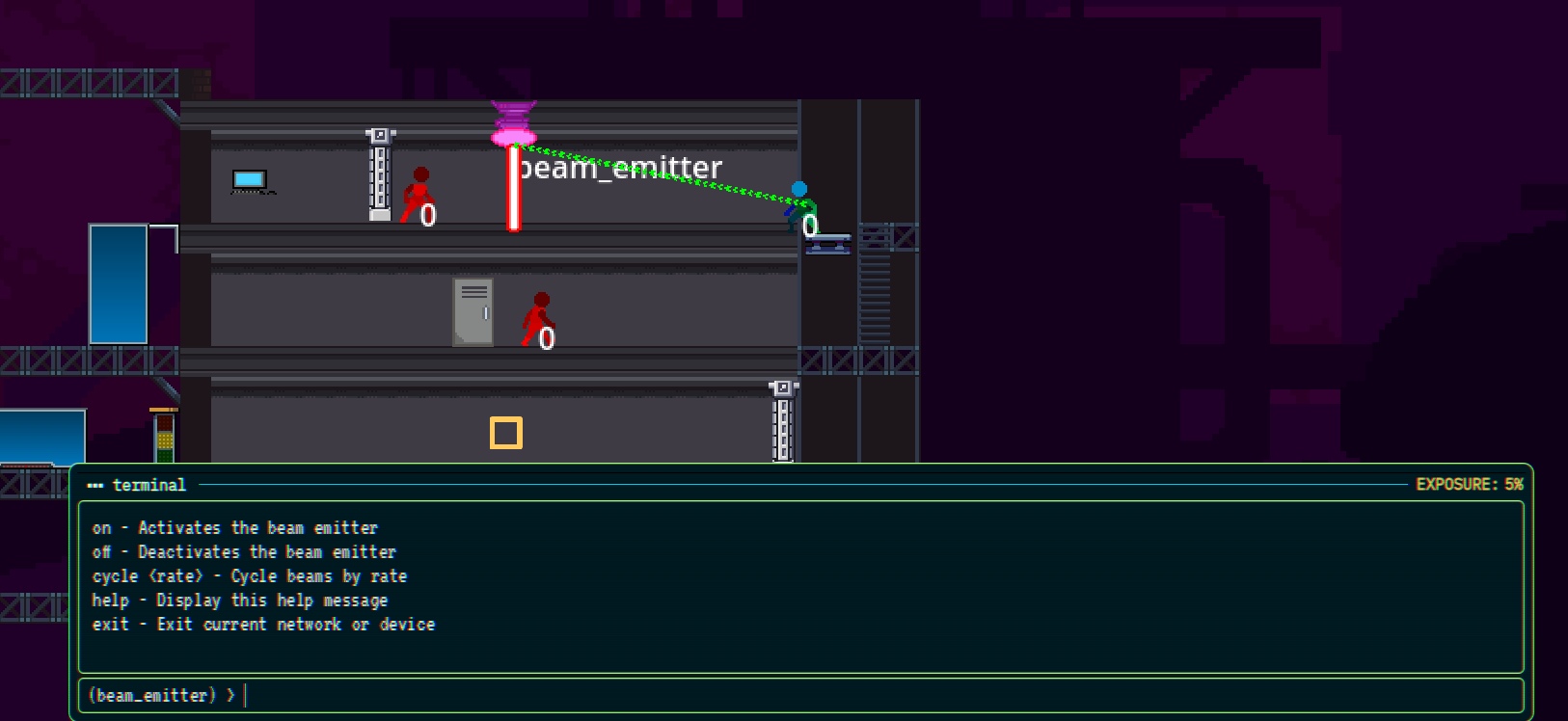
This approach wasn’t much of a time-saver. I still had to define the functions and map the commands. However, this was an area where I planned to get meta. Initially, you would only have access to a certain level of command, but eventually I was imagining giving the player access to the methods and properties on the devices regardless of whether there is an explicit command for them, giving the player the ability to change properties that would have real effects in game.
Did I need this to prove the game? Absolutely not.
Takeaway 3: YAGNI (You Aren’t Gonna Need It). Don’t build complexity until you need it, which, to my shame, is something I advocate for regularly, but didn’t apply here!
Wrapping up
So another one goes into my “graveyard” folder, but not empty-handed. The systems I built are the part I’m most proud of. Devices, networks, strategies and security protocols snap together into puzzles without new code, and that’s the bit I’ll take with me into the next project. The mistake was building everything around that system before I knew it was any fun, and then piling on clever extras that weren’t helping me find it.
Next time the focus will be to find the core loop first by building a simple system, using it to churn out a handful of rough levels in short order, and putting them in front of people before a single line of dialogue is written. I’ll attempt to start as low on the complexity scale as I can get away with, only adding to it in the service of making the game more fun, ideally with real play testing as a metric. Sometimes, if it’s not fun, no amount of worldbuilding will save it, and I definitely held on to this one for too long before taking it behind the shed.